Saturday, October 4, 2025

DIY Electronics Salvage Hack: Fast & Cheap Way to Desolder and Reuse Components with a ZTX Solder Pot (NEODIY Review & Tutorial)


Introduction

If you love DIY electronics, you’ve probably come across old circuit boards full of valuable components just waiting to be reused. From capacitors and resistors to IC chips and transistors — many of these parts can still work perfectly! Instead of letting them go to waste, you can easily salvage electronic components using a ZTX solder pot — one of the fastest and easiest ways to desolder multiple parts at once.

In this post, we’ll show you how to salvage components from old boards using a cheap solder pot, plus a few tips, reviews, and hacks to make your salvaging experience efficient and safe.


Why Salvage Old Electronics?

Old circuit boards — from power supplies, PSUs, radios, and even obsolete machines — often contain rare and valuable electronic parts. Some vintage transistors, ICs, and relays are no longer produced but are still highly sought-after by hobbyists and repair technicians.

By learning how to remove and reuse parts, you not only save money but also help reduce e-waste. It’s a win-win for both your wallet and the planet!


What You’ll Need (DIY Salvage Kit)

To get started, gather the following tools and materials:

  • ZTX Solder Pot (or similar small tin melting pot)

  • Tweezers and pliers

  • Heat-resistant gloves and safety glasses

  • Old circuit boards or scrap electronics

  • Flux and solder wick (optional for cleaning)

  • Container for sorted components

This simple DIY desoldering kit is all you need to remove components fast from through-hole and surface mount (SMD) boards.


How to Use a Solder Pot (Step-by-Step Tutorial)

  1. Heat the Solder Pot
    Plug in your ZTX solder pot and let the solder melt completely. The molten tin acts like a pool for quick desoldering.

  2. Prepare the Board
    Cut your old circuit board into smaller sections. Focus on areas with valuable parts like ICs, transistors, or relays.

  3. Dip and Desolder
    Hold the board with pliers and briefly dip the soldered side into the molten tin. Within seconds, the solder will melt, and the components will loosen.

  4. Remove and Sort Components
    Use tweezers to lift the parts out quickly before the solder solidifies. Place them into sorted containers for resistors, capacitors, chips, and switches.

  5. Clean and Test
    After salvaging, clean each component with isopropyl alcohol and test them with a multimeter before reusing them in your next project.


Why Use a Solder Pot?

Compared to traditional soldering irons or heat guns, a solder pot offers:

  • Speed – Desolder multiple pins in seconds.

  • Ease – Perfect for beginners and pros.

  • Efficiency – Ideal for removing SMD and through-hole parts.

  • Value – Salvage hundreds of components from scrap boards easily.

This makes it one of the best and fastest ways to desolder parts from old electronics — truly a game-changer for DIYers.


ZTX Solder Pot Review (NEODIY YouTube Video)

The ZTX Solder Pot is compact, heats up quickly, and can handle small-to-medium boards without issue. It’s affordable, durable, and perfect for DIY salvage projects.

You can check out the NEODIY YouTube video tutorial for a detailed how-to guide showing this tool in action — removing SMD chips, resistors, and capacitors effortlessly.


Where to Find Salvaged Parts

Here are some great sources for salvage boards and components:

  • Old computer PSUs, routers, or motherboards

  • Junk or scrap electronics markets

  • Broken home appliances (TVs, radios, DVD players)

  • Discarded industrial control boards

Many of these contain rare and valuable parts — perfect for repair projects or DIY inventions.


Conclusion

With a simple solder pot, you can salvage hundreds of reusable electronic components — cheaply, quickly, and safely. Whether you’re a hobbyist, student, or repair enthusiast, learning how to desolder and reuse parts is a must-have skill in your DIY electronics toolkit.

If you’re ready to try it yourself, check out the ZTX solder pot review and NEODIY YouTube tutorial to see how easy and fast it can be to bring old boards back to life!

Friday, October 3, 2025

Perodua Alza Gearbox AT Symbol Blinking | Gear D Tak Jalan & Gear P Susah Start – Punca & Cara Baiki

Perodua Alza AT Symbol Berkelip? Gear D Tak Jalan & Gear P Susah Nak Start

Ramai pemilik Perodua Alza menghadapi masalah bila lampu AT (Automatic Transmission) symbol menyala atau berkelip di dashboard. Bila gear D tak boleh masuk, atau gear P susah nak start, ia pasti menimbulkan rasa risau. Masalah ini bukan sahaja berlaku pada Alza, malah pada model lain seperti Myvi, Bezza, Axia, Ativa, Kembara, dan Avanza.

Dalam artikel ini, kita akan bincangkan punca, simptom, cara scan code, dan cara baiki (DIY atau hantar service) supaya anda faham apa yang berlaku pada kereta anda.


⚠️ Simptom Masalah Gearbox AT Symbol

  • AT light / symbol blinking (berkelip) di dashboard

  • Gear D tak boleh jalan / tak masuk

  • Gear P susah nak start

  • Kereta terasa menyentap (sentap) bila tukar gear

  • Kadang-kadang engine hidup tapi gear tak respon


🔍 Punca Masalah

Masalah ini biasanya berkaitan dengan sistem automatic transmission (auto gearbox). Antara punca yang biasa ialah:

  1. Speed Sensor (Input/Output) rosak

    • Bila sensor tak baca dengan betul, ECU akan hantar signal error → AT light berkelip.

  2. Masalah Wiring atau Connector longgar

    • Wayar putus / connector tercabut boleh buat gearbox tak detect gear.

  3. ATF (Automatic Transmission Fluid) kotor atau kurang

    • Minyak gearbox lama boleh sebabkan gear menyentap atau tak jalan.

  4. Fault Code dalam ECU

    • Bila ada error, AT lampu akan menyala → perlu buat scan code guna OBD.

  5. Gearbox rosak / komponen dalam haus

    • Kalau kereta tahun lama (contoh Alza 2005, 2010, 2014), komponen dalam gearbox mungkin haus.


🛠️ Apa Yang Perlu Buat (What To Do)

  • Scan Code (OBD2 scanner / hantar bengkel) → baca fault code sensor.

  • Check ATF → pastikan minyak gearbox cukup & tukar jika kotor.

  • Periksa Wiring & Fuse → DIY check jika ada wayar longgar atau putus.

  • Service di Bengkel → kalau DIY tak selesai, hantar ke bengkel automotif untuk check lebih detail.


📹 Rujukan Video (DIY / Pengalaman)

Ramai pengguna share pengalaman mereka di YouTube (contoh channel Neodiy) tentang cara DIY baiki masalah AT light berkelip pada kereta Perodua. Video-video ini boleh jadi panduan untuk faham simptom & cara baiki.


❓ Bolehkah Drive Dengan AT Symbol Menyala?

Tidak digalakkan. Bila lampu AT menyala, gearbox mungkin dalam mode selamat (fail-safe mode) → risiko kerosakan lebih teruk kalau terus drive. Sebaiknya, scan code & baiki segera.


✅ Kesimpulan

Masalah Perodua Alza AT Symbol blinking / gear D tak jalan / gear P susah nak start selalunya berpunca daripada speed sensor, wiring, atau ATF kotor. Jangan biarkan masalah ini berlarutan sebab ia boleh merosakkan gearbox sepenuhnya.

👉 Tip: Buat servis berkala, tukar ATF ikut jadual, dan scan fault code bila lampu indikator gearbox menyala.

Thursday, October 2, 2025

Panalux Air Cooler Malaysia Review | Cheap Portable AC & Fan Test PAC-148 | Best Budget Aircond Alternative?

Introduction

If you’re searching for a cheap, affordable, and budget-friendly air cooler in Malaysia, the Panalux PAC-148 portable air cooler has been gaining attention. Many ask: Is it good? Does it really feel like an aircond? In this review, we’ll cover the performance test, cooling method, noise level, and value for money of this viral and trending Panalux cooler in 2025.

This blog is part of the NeoDIY YouTube video reviews series where we test home appliances, fans, and air conditioning alternatives in real-world conditions.


Design & Build Quality

The Panalux PAC-148 looks like a mix between a tower fan and a mini portable aircond. It’s compact, easy to move around, and suitable for bedrooms, small living rooms, or office spaces in Malaysia.

  • Lightweight & portable → easy to shift from room to room.

  • Modern tower design → slim and space-saving.

  • Water tank system → supports evaporative cooling with ice packs for a stronger “aircond” feel.


Performance & Cooling Test

During our cooling test in Kuching, Malaysia, the Panalux PAC-148 delivered:

  • Strong airflow (kipas kuat & laju angin) → comparable to Mikachi or Ozora coolers.

  • Cold breeze with ice water → feels sejuk, though not as cold as a real air conditioner.

  • Multiple modes → normal fan, evaporative cooling, and swing for wider coverage.

  • Noise level → relatively quiet in low mode, slightly louder on high fan speed.

✅ Best for small rooms, bedrooms, or personal space cooling.
❌ Not effective for large rooms compared to a real AC (aircond).


Energy Efficiency

Unlike traditional air conditioners, the Panalux PAC-148 consumes much less electricity. It’s a low-cost cooling solution under $100, making it an excellent choice for budget-conscious households.

  • Affordable running cost → much cheaper than a split aircond.

  • Eco-friendly evaporative method → no harmful refrigerant gases.

  • Good for daily use in Malaysia’s hot and humid weather.


Comparisons – Panalux vs Other Brands

  • Mikachi & Ozora Coolers → similar price range, but Panalux PAC-148 has a sleeker tower design.

  • Traditional Fan (Kipas) → Panalux is stronger and provides colder air when using water/ice.

  • Portable AC units → real portable air conditioners are much more powerful but cost 5x more and consume more electricity.


Pros & Cons

Pros ✅

  • Cheap & budget-friendly (murah)

  • Portable & lightweight

  • Cold air with water/ice packs

  • Strong fan speed (kipas kuat, angin laju)

  • Energy-efficient & eco-friendly

  • Good for small rooms, bedrooms, offices

Cons ❌

  • Not as cold as a real aircond

  • Less effective in large rooms

  • Needs water refills for best performance


Price & Availability in Malaysia

The Panalux PAC-148 portable air cooler is available in Malaysia online and offline stores, often priced under RM400 (~USD $100). For those in Kuching, Sarawak, it’s sold by multiple appliance shops and often bundled with extra cooling packs.


Conclusion

The Panalux PAC-148 air cooler is one of the best cheap cooling solutions in Malaysia for 2025. While it’s not a full replacement for an aircond, it’s powerful, portable, affordable, and energy-efficient, making it perfect for bedrooms, small living rooms, and office spaces.

If you’re on a budget and want a cooler, stronger alternative to a normal fan, the Panalux PAC-148 is a good value-for-money choice.

For a full unboxing, performance test, and noise level review, check out the NeoDIY YouTube video review where we compare it against Mikachi, Ozora, and other budget air coolers.

Best Epson Ecotank L8050 Printer Review 2025 | 6-Color Photo Printing Test, Quality & Price in Malaysia

Introduction

Looking for the best printer for color printing, photos, art prints, or business use in 2025? The Epson Ecotank L8050 stands out as one of the top-rated inkjet printers with its 6-color ink tank system designed for high-resolution, borderless photo printing.

In this review, we’ll cover the L8050 print quality test, features, pros and cons, and why it’s a smart choice for home, office, students, teachers, and small businesses in Malaysia, including those in Kuching, Sarawak.


Why Choose the Epson L8050 Ecotank Printer?

  • 6-color printing system → delivers richer tones and professional-quality prints.

  • EcoTank / Smartank system → refillable ink tanks save costs compared to cartridges.

  • High-resolution HD printing → ideal for photos, posters, stickers, and art prints.

  • Borderless printing → perfect for photography and design projects.

  • Wireless connectivity → supports Wi-Fi, Wi-Fi Direct, and USB.

  • Eco-friendly & cost-saving → uses CISS (Continuous Ink Supply System) technology.


Print Quality Test & Comparison

When tested, the Epson L8050 produced:

  • Sharp black and white documents for school, office, and business purposes.

  • Smooth and vibrant colours for posters, stickers, and HD photo prints.

  • Consistent results in both matte and glossy papers.

  • Borderless printing up to A4, ideal for photographers and artists.

Compared to other cheap inkjet printers, the L8050 Ecotank is a long-term investment that saves money on ink while delivering professional-grade output.


Who is This Printer For?

  • Students & Teachers → affordable cost per page, great for assignments and teaching materials.

  • Home & Family Use → easy to use, wireless printing, eco-friendly.

  • Small Businesses → ideal for printing flyers, posters, business documents.

  • Artists & Designers → 6-color system provides accurate color reproduction for art prints and stickers.

  • Photography Enthusiasts → high-resolution borderless prints for albums and display.


Key Specifications – Epson Ecotank L8050

  • Printer Type: 6-color EcoTank inkjet printer

  • Print Quality: Up to 5760 × 1440 dpi

  • Connectivity: Wi-Fi, Wi-Fi Direct, USB

  • Print Size: A4 borderless

  • Supported Media: Plain paper, photo paper, stickers, specialty papers

  • Ink System: EcoTank / Smartank / CISS continuous refill

  • Eco-friendly: Less waste, lower cost per page


Price & Availability in Malaysia (2025)

In Malaysia, the Epson L8050 is competitively priced compared to other megatank and smart tank printers. Prices vary depending on stores and promotions, but it’s considered one of the best cost-saving printers for color and photo printing in 2025.

Popular sellers in Kuching, Sarawak and nationwide offer bundles with ink bottles, making it even more affordable.


Conclusion

The Epson Ecotank L8050 is one of the best 2025 printers for anyone looking for high-quality color and photo printing. With its 6-color ink system, borderless prints, eco-friendly refillable tanks, and wireless connectivity, it is an excellent choice for students, teachers, small businesses, and families in Malaysia.

For a detailed printing test and comparison, check out NeoDIY YouTube videos where the Epson L8050 is reviewed in action with real-world photo and poster prints.

How to Open HP Laptop 14s-cf2xxx and Upgrade RAM from 4GB to 8GB | DIY HP Notebook Disassembly & Memory Replacement Tutorial


Introduction

If you own an HP Laptop 14s-cf2xxx series and feel that the performance is slowing down, one of the easiest and most effective upgrades you can do is to increase the RAM from 4GB to 8GB. This DIY tutorial will guide you step by step on how to open, disassemble, and upgrade the memory of your HP notebook safely. Whether you’re in Malaysia or anywhere else, this how-to guide will help you check compatibility, understand specifications, and improve your laptop’s overall performance.


Why Upgrade RAM from 4GB to 8GB?

  • Better multitasking: 8GB allows you to run more apps without lag.

  • Improved performance: Especially important for budget laptops with Intel i3 processors.

  • Future-proofing: Extends the usable life of your notebook.

  • Affordable upgrade: RAM is one of the cheapest ways to boost speed.


Step-by-Step Tutorial: How to Open and Upgrade HP Laptop 14s-cf2xxx

1. Prepare Tools & Materials

  • Small Phillips screwdriver

  • Plastic prying tool (to avoid scratching the case)

  • Anti-static wrist strap (recommended)

  • Compatible RAM stick (DDR4 SODIMM, 8GB – check HP specifications)


2. Power Off & Safety

  • Shut down your laptop completely.

  • Unplug the charger and all peripherals.

  • Hold down the power button for 10 seconds to discharge residual power.


3. Disassembly – Opening the HP Notebook 14s-cf2xxx

  • Place the laptop upside down on a clean surface.

  • Remove all visible screws from the back panel.

  • Use a prying tool to carefully open and lift the bottom cover.

  • Be gentle to avoid breaking the plastic clips.


4. Locate the RAM Slot

  • The RAM slot is usually near the battery inside.

  • On HP 14s-cf2xxx, you will see one stick installed (4GB).

  • Check the available slots – some models have 1 slot only (replacement), others have 2 slots (upgrade/dual-channel).


5. Replace / Install RAM

  • If 1 slot only: remove the 4GB RAM and replace it with 8GB.

  • If 2 slots: simply add another 4GB stick to make 8GB total.

  • Insert the RAM at a 45-degree angle and push down until it clicks.


6. Reassembly

  • Carefully put the bottom panel back.

  • Tighten all screws.

  • Ensure all clips snap back in place.


7. Check Installation

  • Power on the laptop.

  • Enter BIOS/UEFI (usually F10 or ESC at startup).

  • Check if the new RAM is detected (8GB).

  • Alternatively, in Windows: Right-click This PC > Properties and confirm memory size.


Compatibility & Specifications

  • Type: DDR4 SODIMM

  • Frequency: Check existing stick (usually 2400MHz or 2666MHz for Intel i3 budget laptops).

  • Brands: Crucial, Kingston, Corsair, Adata are reliable.

  • Maximum supported: Some HP 14s models support up to 16GB – check HP official specs before upgrading.


Maintenance Tips

  • Always use matching RAM speed for dual-channel.

  • Avoid static damage by grounding yourself before touching internal parts.

  • Clean dust from vents and fans during disassembly for better cooling.


Conclusion

Upgrading the HP Laptop 14s-cf2xxx RAM from 4GB to 8GB is a simple but highly rewarding DIY project. With just basic tools and the right compatible memory, you can dramatically improve your laptop’s performance for daily tasks, studying, or light productivity.

For a visual teardown tutorial, check out NeoDIY YouTube videos where similar HP notebook disassembly and RAM upgrade demonstrations are shown step by step.

Saturday, September 20, 2025

DIY Guide: How to Install a Ventilation Fan in Difficult Frames

Sometimes the biggest problem with home improvement is not the lack of tools, but the fact that the frame or wall space is not ideal for installation. This is especially true when you want to install a ventilation or exhaust fan in your kitchen, bathroom, toilet, or bedroom. If the size doesn’t match, you’ll need creative DIY solutions to make it work while still ensuring good indoor air circulation.

In this how-to tutorial, we’ll go step by step on different mounting methods and the best practices to achieve a proper fit. Whether you live in a terrace house, flat, or apartment in Malaysia (2025), this guide will help you find a cheap, energy-efficient solution to improve air quality and reduce humidity.


Why Install a Ventilation Fan?

  • Improves Indoor Air Quality – Removes smoke, odor, and excess moisture.

  • Keeps Rooms Cool (rumah sejuk) – Helps air circulation in hot weather.

  • Reduces Noise & Smell – Choose quiet, low-noise extractor fans for comfort.

  • Prevents Mold Growth – Essential in bathrooms and kitchens where dampness is common.

  • Saves Electricity (jimat elektrik) – Modern fans are designed for energy efficiency.


DIY Guide: How to Install a Ventilation Fan in Difficult Frames

1. Measure & Adjust the Frame

If your wall or window frame is smaller or larger than the fan size, you can create a custom mounting board using plywood or PVC sheet. Cut it to fit the opening, then attach the fan securely.

2. Wall-Mounted or Window-Mounted Options

  • Wall-mounted exhaust fans (kipas ekzos dinding) are best for kitchens and bathrooms.

  • Window-mounted fans are perfect when there’s no external wall space.

3. Using Ducts for Airflow Direction

In tight spaces, you can add an HVAC duct or vent pipe to guide airflow outside. This is useful in small rooms or teres rumah where direct mounting isn’t possible.

4. Silent & Low-Noise Setup

Look for quiet extractor fans or brands like Khind that are known for low noise performance. This makes them suitable for bilik tidur (bedrooms).

5. Temporary or Cheap DIY Fixes

If you cannot cut the wall, use a portable extractor fan setup. Some mini ventilation fans can be mounted with brackets or simply fixed near a window vent.


Popular Brands & Reviews in Malaysia (2025)

  • Khind Ventilation Fans – Affordable and widely available on Shopee & Lazada.

  • Panasonic & KDK – Reliable, higher-end models with quiet operation.

  • No-Brand DIY Fans – Budget-friendly, best for temporary solutions.

You can find plenty of reviews, YouTube tutorials, and NeoDIY videos showing different ways to install exhaust fans in kitchens (dapur), bathrooms (bilik mandi), or flats where traditional mounting isn’t possible.


Final Thoughts

Installing a ventilation or exhaust fan in an unusual frame can feel like a challenge, but with the right DIY setup, mounting ideas, and airflow solutions, you can make it work. Whether you need a quiet fan for bedrooms, a strong extractor for the kitchen, or a cheap solution for bathrooms, the key is adapting the installation method to your space.

By following this how-to guide, you’ll enjoy better indoor air circulation, reduced noise, lower electricity bills, and a fresher home in 2025 and beyond.

Cheap Automatic Water Level Float Valve to Prevent Overflowing in Water Tank

A cheap automatic water level float valve is one of the simplest yet most effective ways to prevent overflowing in your water tank. Instead of constantly worrying about shutting off your pump or manually monitoring the tank, this automated water level control system uses a simple float valve to stop water flow once the tank is full. It’s an easy solution for homes, farms, and even aquariums where overfilled tanks can lead to spillage, pressure problems, or bulging walls.

Unlike complex electronic controllers, the mechanical float valve works passively. When the water rises, the float moves up and shuts off the inlet automatically. When the level drops, it reopens, allowing constant refill. This simple principle prevents overflow, overpressure, and waste without electricity.

Why Use an Automatic Water Level Float Valve?

  1. Prevents Overfilled Tanks – No more climbing up to check water manually.

  2. Protects Against Bulging & Cracks – Excess water pressure can damage PVC or plastic tanks.

  3. Simple DIY Installation – Most models can be installed at home with basic tools.

  4. Cheap & Compact – Available in mini float valves for 1/2 inch and 1/4 inch inlets.

  5. Durable – Works as a mechanical shutoff system with no power required.

Common Applications

  • Household water tanks (plastic, PVC, or concrete).

  • Aquariums to keep water at constant levels.

  • Small reservoirs and garden tanks.

  • Homemade DIY projects for constant water flow control.

Types of Automatic Float Valves

  • Vertical installation valves – Perfect for tanks with side inlets.

  • Horizontal float valves – Designed for top or side-mounted inlets.

  • Compact mini designs – Great for aquariums or small systems.

How to Install (DIY Tutorial)

  1. Drill or locate the inlet hole on your tank.

  2. Insert the float valve and tighten with the provided fittings.

  3. Connect the inlet pipe (1/2 inch or 1/4 inch).

  4. Test by filling the tank – watch as the float shuts off water automatically.

  5. Adjust for best performance if needed.

For visual learners, there are plenty of YouTube tutorials and how-to videos on automatic float valve installation, including NeoDIY step-by-step guides.

Where to Buy Cheap Float Valves

You can easily find these valves on Shopee, Lazada, or other online marketplaces. Search for keywords like automatic water level controller, ballcock float valve, or mini PVC float shut-off. Prices are very affordable, making them the cheapest water overflow prevention system in 2025.

Final Thoughts

A cheap water level float valve is more than just a tool—it’s protection for your home system. It keeps tanks from overflowing, spilling, or cracking under pressure, while offering a simple, DIY, and reliable shut-off solution. Whether it’s for your home water tank, aquarium, or a homemade system, this little device ensures constant refill and prevention against waste—all at a fraction of the cost of electronic controllers.

Friday, September 12, 2025

Pivot Mega Raizin Voltage Stabilizer Review – Genuine or Fake?

When it comes to 12 volt (12V) voltage stabilizers, one of the most talked-about names in the tuning scene is the Pivot Mega Raizin. Marketed as a voltage regulator that connects to your battery and improves performance for both car (kereta) and motorbike (motosikal), it has become a hot topic in forums, YouTube videos, and even viral racing reviews. But is it really good or bad? And how do you spot an original from a counterfeit?

What Does a Voltage Stabilizer Do?

A voltage stabiliser works by smoothing DC fluctuations in your car’s electrical system. Using a capacitor with enough capacitance, it can reduce headlight dimming, help with audio quality, and in some cases, improve throttle response. Many users online highlight the kelebihan (advantages) of having a stable 12V supply, especially in modified cars and bikes.

Read Als: HomeMade DIY HowTo Make: How to Make a Homemade Car Voltage Stabilizer (DIY Guide)

The Problem of Fakes and Knockoffs

The popularity of Pivot and Mega Raizin has led to a flood of false, counterfeit, bogus, imitation, copy, knockoff, and cloned stabilizers on the market. Some are just empty boxes with flashy lights pretending to be a genuine product. Others may use low-quality capacitors that don’t actually stabilize voltage. Many drivers have reported scams when buying cheap units online, making it hard to trust reviews.

Reviews: Good or Bad?

  • Good: A genuine Pivot Mega Raizin can help with racing setups, reduce DC spikes, and improve electrical consistency.
  • Bad: A fake or cloned stabilizer is basically useless and sometimes even dangerous to your battery.

This is why checking reviews from trusted sources is crucial before buying.

Conclusion

Whether for car or motorbike (kereta or motosikal), a Pivot Mega Raizin voltage stabilizer can be useful — but only if you buy the original. The market is full of knockoffs and scams, so be cautious. Always look for trusted sellers, watch YouTube reviews, and compare before purchasing. In the end, the difference between good and bad comes down to whether your stabilizer is genuine or fake.

For more DIY insights, keep an eye on neodiy tutorials and trending automotive reviews — they might just save you from buying a bogus unit.

How to Make a Homemade Car Voltage Stabilizer (DIY Guide)

If you’ve ever searched howto or how to make a car voltage stabilizer, you’ve probably seen terms like Pivot Mega Raizin, hyper booster, or super capacitor stabiliser pop up on forums, YouTube videos, and even trending viral DIY tutorials. But what does a car voltage stabilizer actually do, and is it really worth it? Let’s dive in.

What is a Car Voltage Stabilizer?

A voltage stabilizer (or stabiliser) is an automotive 12V device that connects to your battery and grounding cables. Its purpose is to regulate electrical spikes (sometimes called hyper spikes) and provide smoother voltage delivery to the car’s electrical system. Brands like Pivot Raizin or Mega Raizin made them popular, especially in the tuning world, with claims of more horsepower, better torque, and improved throttle response.

Read Also: HomeMade DIY HowTo Make: Pivot Mega Raizin Voltage Stabilizer Review – Genuine or Fake?

How to Make a DIY Voltage Stabilizer

This setup can be built at home using affordable parts from online shops. In Malaysia, many kereta owners even make their own using cheap bateri accessories from Shopee.

Pros and Cons

Pros:

  • Can stabilize voltage and reduce flickering lights.
  • Helps protect sensitive electronics.
  • Fun DIY project for enthusiasts.

Cons:

  • Won’t magically give more horse power or torque in most cases.
  • Some products are just grounding cable boosters in fancy cases.
  • Real results vary depending on your car’s condition.

Does It Really Work?

That’s the big debate! Some drivers swear by them, especially in older cars like Perodua Alza, while others see little difference beyond cosmetic effects. Like many mods, results depend on your vehicle and expectations.

Conclusion

A homemade car voltage stabilizer is one of those DIY automotive projects that’s fun to try, relatively cheap, and can go viral on YouTube when done right. It may not turn your car into a racing beast, but it can help with voltage regulation, reduce spikes, and teach you more about car electronics.

If you’re into neodiy projects, testing, and reviews, building your own stabilizer could be the best way to learn whether these devices really work for you.

Monday, September 1, 2025

Cheap Shopee Cordless Rechargeable Mini Vacuum Review 2025 – Best Budget Car Cleaner


Looking for a cheap Shopee cordless rechargeable mini vacuum in Malaysia? Read our full review with unboxing, test, demo, performance on cars, pets, and home cleaning. Best murah pilihan 2025 for Kuching, Sarawak & nationwide.

Why Buy a Cordless Rechargeable Mini Vacuum from Shopee?

If you’re searching for the best cheap cordless vacuum in 2025, Shopee Malaysia offers plenty of budget-friendly, murah, paling value for money options. These wireless portable vacuums are perfect for:

  • Car (kereta) interior detailing

  • Pet hair cleaning (dogs, cats, fur)

  • Small spaces like desks, sofas, and cupboards

  • Wet & dry mess (crumbs, dust, light liquid spills)

Many users leave positive reviews on Shopee and Lazada, praising these mini handheld vacuums as lightweight, powerful (kuat), and easy to use.


Unboxing & First Impressions

When ordering from Shopee or Lazada, the package usually includes:

  • Cordless Mini Vacuum Cleaner

  • USB charging cable (some models also support 12V car charging)

  • Washable filter (easy to clean & reuse)

  • Attachments / nozzles for tight spaces

  • Optional wet/dry cleaning accessories

The build is small, compact, and lightweight, making it easy to carry around. Great for on-the-go cleaning in cars or quick house tidying.


Performance Test & Demo (Video/YouTube)

We tested this Shopee cordless rechargeable vacuum on different surfaces:

  • Car Interior (Kereta Cuci & Detailing)
    Picks up dust, crumbs, and even sand effectively.

  • Pet Hair & Fur
    Works well on cat fur and dog hair when using the brush nozzle.

  • Desk & Electronics
    Strong enough for dust around keyboards, fans, and small appliances.

On YouTube demo videos (search “neodiy cordless mini vacuum test”), many show that it performs well for everyday cleaning tasks.


Key Features That Make It Worth Buying

  • Cordless & wireless – No cable mess

  • Rechargeable via USB/12V – Charge in car or at home

  • Strong suction (kuat) – Handles daily dust & pet fur

  • Wet/Dry function – Some models support both

  • Washable filter – Easy maintenance

  • Multiple attachments – Perfect for car detailing & tight spaces

  • Budget friendly (murah, paling murah) – Great value for money


Value for Money in Malaysia

Also available on Lazada Malaysia with similar features.
Often comes with ready stock Malaysia and fast shipping to Kuching, Sarawak.

Compared to premium vacuums, this is one of the cheapest cordless handheld cleaners you can buy online.


Final Verdict – Best Cheap Cordless Mini Vacuum on Shopee 2025

If you need a lightweight, rechargeable, strong suction (kuat) mini vacuum for your car, pets, and small home spaces, this is definitely worth considering. It’s not as powerful as Dyson or Xiaomi, but for the cheap harga paling budget, it’s a viral cleaning gadget in Malaysia.

Browse Shopee now with keywords like:

  • “cordless mini vacuum murah”

  • “kereta car cleaner portable”

  • “wet dry rechargeable vacuum”

Perfect for budget users, pet owners, and car detailing enthusiasts in 2025.

Sunday, March 31, 2019

Simple 4G LTE signal booster / amplifier that finally works

The components are purchased cheaply and yet the circuit is also very simple. This is my first prototype 4G LTE indoor signal booster that I am currently building to solve the slow internet connection that I've experience for so long.

In the past 9 years streamyx internet connection has been doing unfair capped bandwidth at 2 Mbps and yet the reality performing only around 0.5 Mbps ~ 1 Mbps and the connection keeps on turning on and off. Then I go for DiGi 4G LTE 100 GB internet package that comes with the HuaWei WiFi mobile modem - it's doing alright with signal strength around 1 to 2 bar performing at 3 Mbps and below. I guess anyone out there using Digi Internet experiencing almost the same day in day out. I am pretty sure of that unless your house is located next to the Cell Tower station.

Based on the android signal software analysis the DiGi could actually provide up to 72 Mbps super fast connection but that's probably if the device is placed right on the cell tower microwave antenna which is not going to happen. In reality we will get around 1 Mbps ~ 3 Mbps and sometimes 5 Mbps depending on the proximity between the device (mobile phone) to the cell tower distance. That speed usually linger around -107 dBm to -101 dBm which is below average. This happens usually when you are inside the house.

Signal Strength Analysis based on LTE discovery android software:

-107 dBm to -101 dBm = 1 Bar
-99 dBm to -90 dBm = 2 Bar
- 89 dBm to 80 dBm = 3 Bar
- 70 dBm and below full bar

Which means the higher the negative value the weaker is the signal strength otherwise the lower the negative value is the stronger the signal strength.

Having said all that I've made quite sometimes of research to build antenna amplifier / booster for the HuaWei modem to get better signal that it is currently receiving. And here comes the final prototype running on 20 Mhz crystal to modulate the weaker signal into 20 Mhz output.

The following are the components:

20 Mhz Crystal Oscillators
Coupled Inductor 20 mH
Air core inductor 2.5 Turns
2 x Input antennas (to harvest signal from surrounding environment)
1 x Output signal to transmit / broadcast the signal to the HuaWei modem


Despite the circuit output only 20 Mhz but there is quite significant impact of it to the HuaWei Modem signal - as you can see in the video demonstration it could amplify up to 4 bars signal which increase the internet speed within 9 Mbps to 15 Mbps range. And the signal strength is very consistent as oppose to without the amplifier circuit.

NOTE: When signal is very weak within your area - the modem signal strength sensitivity becomes very high which means a slight movement and placement (angle) of the modem could effect the signal strength significantly. That's why if you found a good spot and position where the signal is very strong take note of it because the rest of other positions / placement could be very bad. In this circuit do not place the transmitting antenna too close to the modem because the signal output will over powered the modem input signal. Placing too far is also not good because the signal cannot reach the modem. In my case i purchased special made 4G LTE antenna with two coil on the antenna and placed it within 7 cm away from the modem. This is the best distance that i have experimented. I believe different antenna could possibly emitting different signal strength - so self experimentation is required how far it is from the modem.

To ensure your circuit works - test using a multimeter with the Hertz mode. The crystal should transmit / oscillate around 8 Mhz ~ 12 Mhz at the output and the ground of the crystal should generate around 2 Mhz ~ 4 Mhz. If anything lower than this it could affect the signal strength - please experiment at your own discretion. Connect only the output connection to the output antenna and do not connect the ground because it will provide a constant frequency 20 Mhz. A constant frequency is not good and you must allow it to oscillate to emit the RF signal.

Cheap WeBoost 4G LTE Booster | Homemade WeBoost 4G Booster | DIY WeBoost Mobile Amplifier | Cheap RF Amplifier | Homemade simple mobile signal booster | hiboost, surecall, verizon, tmobile, wilson booster

How to make simple powerful (high voltage) taser (stun gun) - DIY

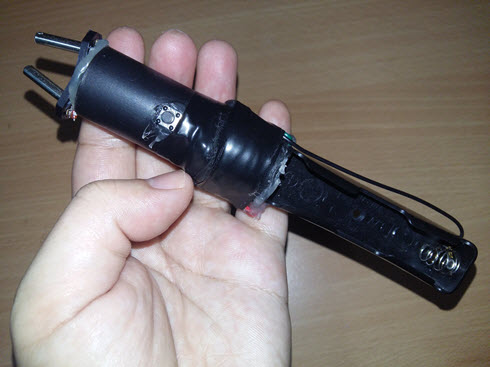
Using very cheap and little components (high voltage transformer + 18650 battery holder + 2 plug pin) you can make a very powerful stun gun (taser) for self-defense. All the material combined is less than $10 USD to buy them all. The high voltage transformer claimed to generate around 400,000 volts from 3.7 battery - although this might not be exactly true the transformer is quite powerful indeed. The spark/arc generate very loud clapping sound which can shock someone painfully.

This is a really easy project and using common materials that you can find in the electronic shop except for the high voltage generator which you need to buy from eBay. However please be reminded the device can hurt someone really bad - so don't use it on anyone for playing.


DIY Taser | How to make crazy powerful stun gun | Cheap Taser | Powerful Homemade taser | High voltage homemade stun gun | 3.7 volt to 400,000 volt stun gun | step by step $5 dollars taser | how to make self defense weapon | membuat senjata bela diri | cheap homemade taser | make extremely powerful taser | how to make stungun tutorial

Simple Easy 3.7 Volts DC to 3000 Volts AC - Power Moseft IRFZ48N

A simple circuit to convert 3.7 Volt DC battery to 3000 Volts AC using fast switching power mosfet IRFZ48N. The transformer is salvaged from faulty power supply with center tap primary. The component is very simple and easy to put together

The DC to AC circuit

1 x 1000 Ohm Resistor
1 x IRFZ48N Power Mosfet
1 x Mini step up transformer with center tap primary

The Voltage Multiplier to amplify the voltage up to 3000 volts

8 x Ceramic layer capacitors that can withstand up to 3 kilo Volts (3kV) of voltage and 8 diodes 1N4007 diodes. This is the simple schema if you have any question just let me know


10 Nano Farads Ceramic Capacitor or 0.001 Micro Farad is good enough


Simple RF Mobile Signal Detector Schematic Diagram Circuit to detect VHF/UHF 4G LTE

Very cool RF mobile signal detector from simpletronic - the circuit is main driven by high frequency RF transistor up to 6 Ghz maximum. It can easily detect low frequency and high frequency electromagnetic and RF signal. In this demonstration using a smart mobile phone using 4G LTE (2600 Mhz / 2.5 Ghz Frequency) and when the internet is running the signal will be captured as a result the LED lights up. Another test is done on an antenna that transmitting 20 Mhz signal and it lights up brightly because the power used is 5 Volt to amplify the 4G modem.

Component of the mobile signal detector circuit

100 Ohm, 10 KOhm, 47 KOhm - Resistors
10 KOhm - Variable Resistor
BFG591 (UHF 6 Ghz Frequency RF Transistor)
Blue LED
10 pF - Ceramic Capacitor
10 Cm - Antenna
CR2032 (3 Volt) Battery


Circuit Schematic Diagram


How to detect 4G signal | 4G signal detector | Mobile Signal Detector Circuit |

4G Signal booster / amplifier circuit using LM386

This is just an experiment to test if it is possible to amplify / boost 4G signal for the HuaWei-E5577 modem so that i can enjoy decent internet speed consistently. The circuit is very simple driven by LM386 amplifier IC and two antenna. One is the receiver antenna another the transmitter antenna powered by 5 Volt USB PC usb power supply.

The complete component is as follow

1 x project box for casing
1 x 4700 uF Electrolyte capacitor
1 x 1000 uF Electrolyte capacitor
2 x 4.7K Resistors
2 x Antennas with SMA male connectors
1 x USB female port
2 x SMA female connectors


The output of the result is very interesting - although there is no sign of signal indicator increase on the Huawei-E5577 modem but the internet connection looks faster than usual and it is very consistent. Despite of having 1 bar 4G signal the internet still capable of loading YouTube videos very smoothly and serve the internet normally. 

I understand that this amplifier is not capable of delivering 4G signal but the RF amplification via the LM386 seems to have effect on the HuaWei-E5577 modem. Noted that the amplification doesn't seem to work on normal smart phone device. Not sure what exactly the cause.

Anyway now i can enjoy consistent internet speed that have been poor for the past 9 years. It's different this time.

NOTE: Some people may not believe this works - but please take be reminded i do not post something that doesn't work. And at the very least it works for me.


4G Amplifier / booster circuit schematic diagram